Tu factura de IA,
Desglosada
Herramientas compatibles, 36 y subiendo


La app de la barra de menús
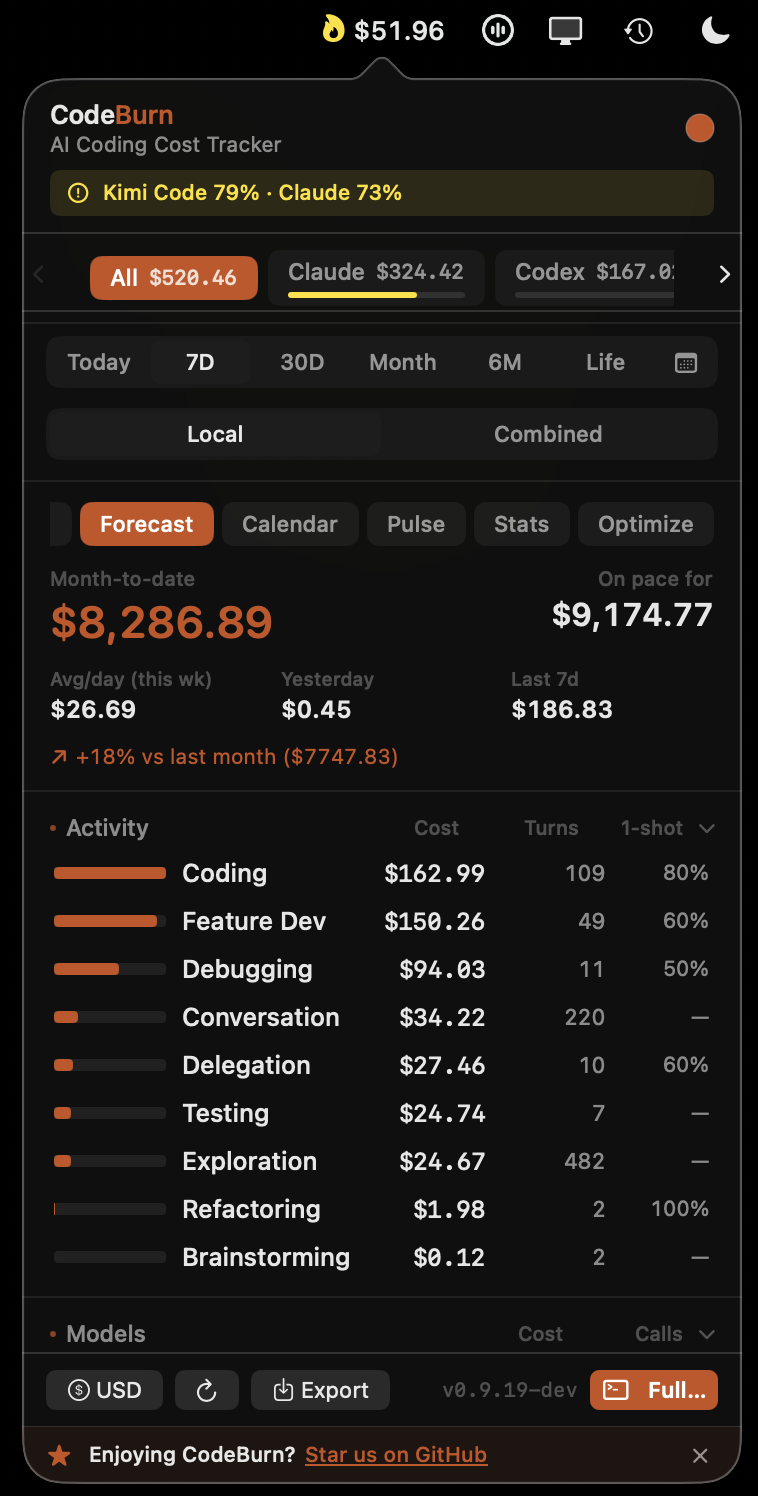
Antes te enterabas a fin de mes. Ahora la cifra vive junto a tu reloj todo el día, por encima de cualquier ventana, y con un clic se abre la factura entera.
El gasto del día vive junto a tu reloj. Sin abrir paneles ni buscar pestañas.
Uso del plan medido en vivo para cada agente, con el tiempo restante de cada ventana.
Totales por agente desde hoy hasta siempre, locales o combinados entre tus equipos.
Gasto dividido por actividad: programar, depurar, desarrollar, con turnos y tasa de acierto a la primera.
Swift nativo. Solo lee archivos de sesión locales. Nada sale de tu Mac. En Linux, la misma cifra vive en tu barra superior de GNOME.
La app de escritorio
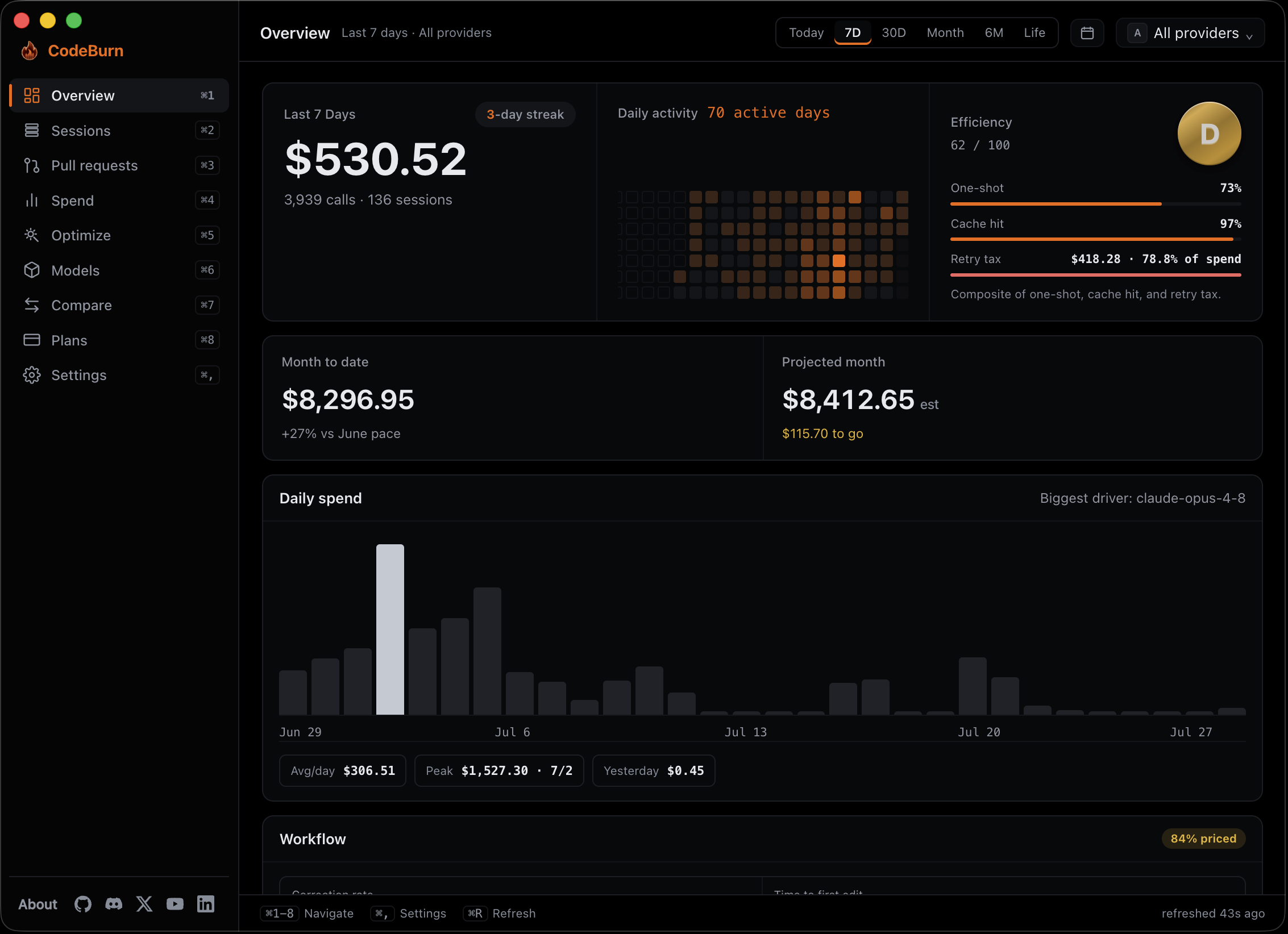
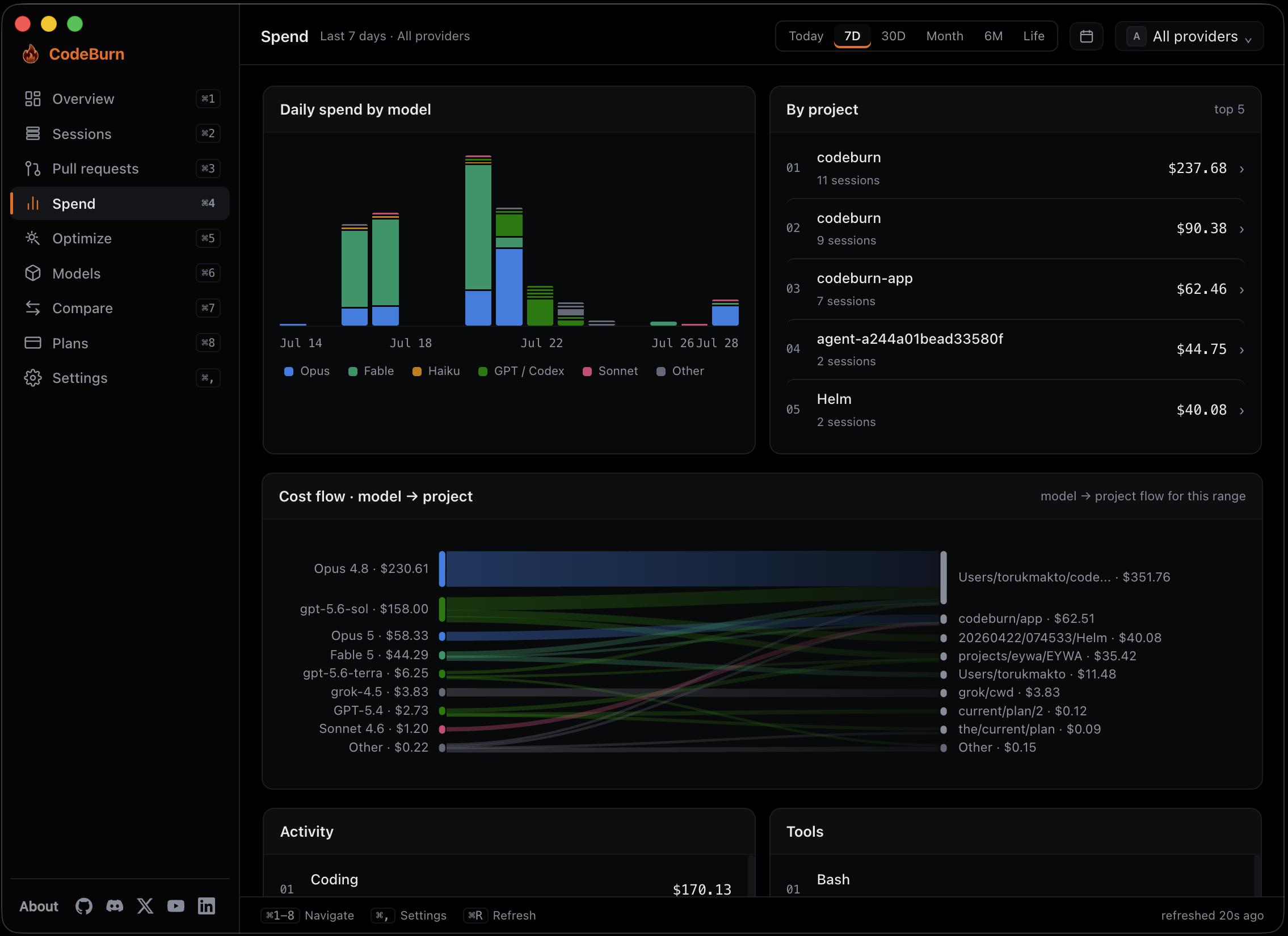
La factura deja de ser una cifra y se convierte en un mapa: qué modelo, qué proyecto, qué sesión y si el trabajo que pagaste sobrevivió.
El flujo de coste muestra qué modelo gastó en qué repositorio, en el rango que elijas.
Una puntuación de eficiencia construida con acierto a la primera, aciertos de caché e impuesto de reintentos.
Un total mensual proyectado, con tu ritmo medido frente al mes pasado.
Gasto atribuido a las ramas y los PR que el trabajo produjo realmente.
Gratis y de código abierto. macOS, Windows y Linux.
La terminal
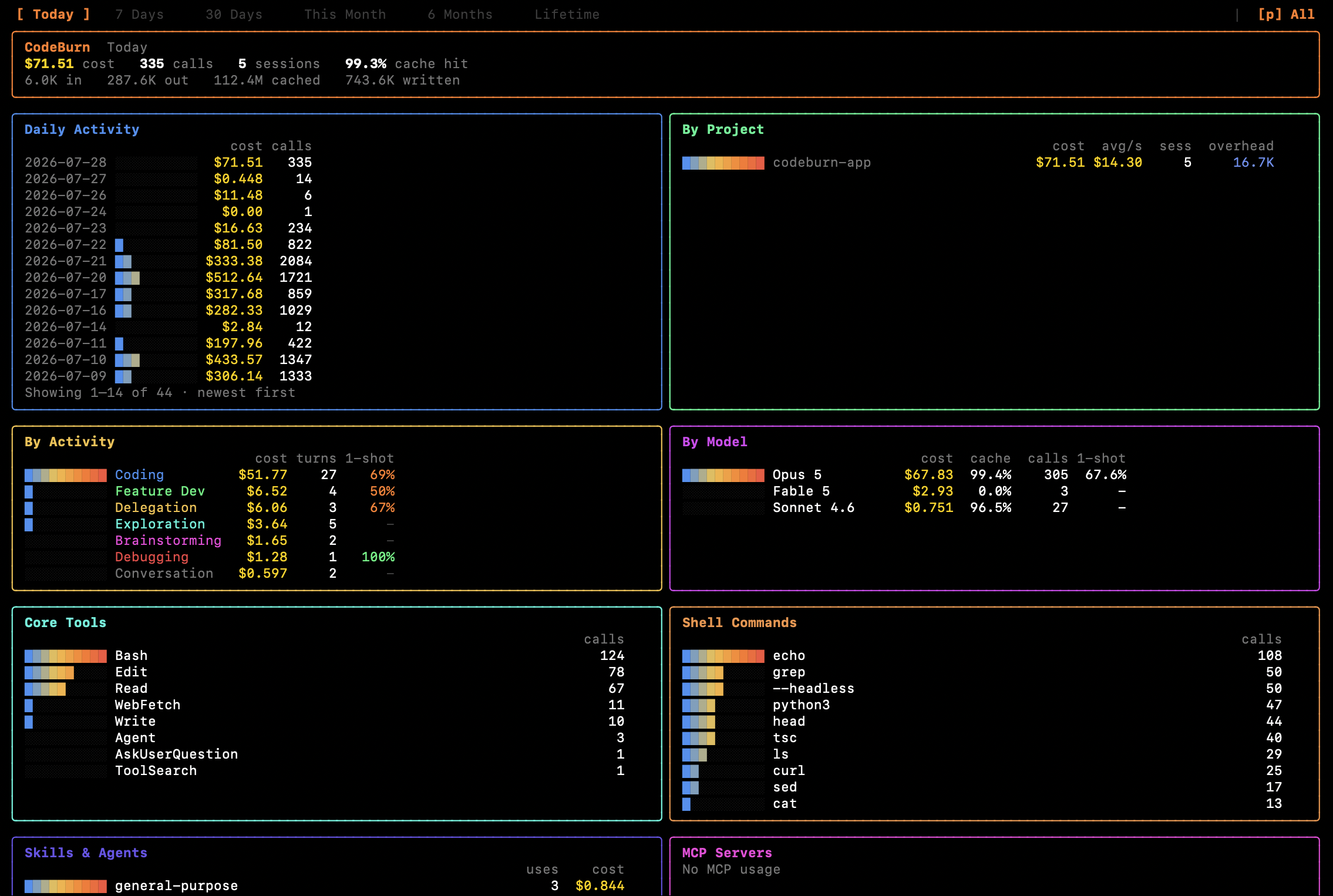
Ejecuta npx codeburn y el panorama completo se abre donde ya estás. Sin instalar, sin cuenta, sin configurar.
Cambia toda la vista entre hoy, una semana, un mes, seis meses o todo lo que hayas ejecutado.
Proyecto, modelo, actividad, herramientas, comandos de shell, skills y agentes, todo a la vez.
Tasa de caché, turnos y porcentaje de acierto a la primera junto a cada coste, no en otro informe.
Usos y coste de los servidores MCP, skills y agentes delegados que entraron en tus ejecuciones.
También en Homebrew. Los mismos totales que leen la barra de menús y la app.
De GitHub a Hacker News, los desarrolladores hablan de CodeBurn.
THIS TOOL SHOWS YOU EXACTLY WHERE YOUR CLAUDE CODE TOKENS ARE GOING. This guy was spending $200+ a day on Claude Code with zero visibility into what was eating the tokens. So he built a terminal dashboard that reads your session transcripts and classifies every single turn.
“This is actually pretty useful. Most people have no idea how much they're spending on AI tools until it adds up, so having it visible in the menubar makes a lot of sense. Really solid idea though, especially being open source.”
“Wait this is so sick! Definitely adding this when I get home”
“big thanks! needed this so badly.”
“Thank you - very interesting. I will try it out.”
“Beautiful”
“We definitely need to install this before our Polymarket scripts bankrupt us on API calls”
“CodeBurn Is The Latest Usage Tracker Blowing up On Github. 435 likes, 16K+ views.”
“You may want to bookmark this!! Do you know the true dollar cost of every Claude Code session?”
“Thanks for the quick turnaround and for getting the invariants right. The reconciliation guarantee is what makes this safe to consume.”
THIS TOOL SHOWS YOU EXACTLY WHERE YOUR CLAUDE CODE TOKENS ARE GOING. This guy was spending $200+ a day on Claude Code with zero visibility into what was eating the tokens. So he built a terminal dashboard that reads your session transcripts and classifies every single turn.
“This is actually pretty useful. Most people have no idea how much they're spending on AI tools until it adds up, so having it visible in the menubar makes a lot of sense. Really solid idea though, especially being open source.”
“Wait this is so sick! Definitely adding this when I get home”
“big thanks! needed this so badly.”
“Thank you - very interesting. I will try it out.”
“Beautiful”
“We definitely need to install this before our Polymarket scripts bankrupt us on API calls”
“CodeBurn Is The Latest Usage Tracker Blowing up On Github. 435 likes, 16K+ views.”
“You may want to bookmark this!! Do you know the true dollar cost of every Claude Code session?”
“Thanks for the quick turnaround and for getting the invariants right. The reconciliation guarantee is what makes this safe to consume.”
A handy little tool I discovered, specifically designed to keep tabs on the token bills for Claude Code and Codex. When you usually use AI to write code, where the tokens are spent, which model burns through money the fastest.
“Very nice. Feels like one of those tools that becomes obvious the moment you see your spend broken down this clearly. Looks like the project has great velocity now.”
“I'd love something like this Claude Desktop. Looks great.”
“Been using this a lot since I discovered it a few weeks ago. Thanks for building and sharing!”
“Looks like it may be useful, thank you”
“Looks cool! Is it able to track stats for models that I use through a non-opencode subscription? Like if I use gpt-5.3-codex through a chatgpt subscription in opencode, will I be able to see some usage stats for it?”
“This is a game changer for anyone trying to scale their agentic workflows without going broke. Visualizing where the tokens actually go makes it much easier to optimize your development budget.”
“CodeBurn, an open-source dashboard built by the AgentSeal team that answers the one question every developer using Claude Code or Cursor is frustrated about: where the hell did all my tokens go?”
“ah nice, you are doing some amazing work. Just to let you know — Visa has forked CodeBurn internally and suggested employees try it.”
“Thanks for shipping this so quickly. Two choices are nicer than what I proposed. NSStatusItem.variableLength is a cleaner answer, and Int((cost * rate).rounded()) rounds correctly where my version would silently truncate.”
A handy little tool I discovered, specifically designed to keep tabs on the token bills for Claude Code and Codex. When you usually use AI to write code, where the tokens are spent, which model burns through money the fastest.
“Very nice. Feels like one of those tools that becomes obvious the moment you see your spend broken down this clearly. Looks like the project has great velocity now.”
“I'd love something like this Claude Desktop. Looks great.”
“Been using this a lot since I discovered it a few weeks ago. Thanks for building and sharing!”
“Looks like it may be useful, thank you”
“Looks cool! Is it able to track stats for models that I use through a non-opencode subscription? Like if I use gpt-5.3-codex through a chatgpt subscription in opencode, will I be able to see some usage stats for it?”
“This is a game changer for anyone trying to scale their agentic workflows without going broke. Visualizing where the tokens actually go makes it much easier to optimize your development budget.”
“CodeBurn, an open-source dashboard built by the AgentSeal team that answers the one question every developer using Claude Code or Cursor is frustrated about: where the hell did all my tokens go?”
“ah nice, you are doing some amazing work. Just to let you know — Visa has forked CodeBurn internally and suggested employees try it.”
“Thanks for shipping this so quickly. Two choices are nicer than what I proposed. NSStatusItem.variableLength is a cleaner answer, and Int((cost * rate).rounded()) rounds correctly where my version would silently truncate.”
Someone was spending $200+ a day on Claude Code with no idea where the tokens were going. So they built a terminal dashboard that classifies every session turn into 13 categories. More than half the money was going to conversation, not code. One line install: npx codeburn.
“Great to see someone actually evaluating, sharing data and insights over the hundreds of "this sucks" posts with zero context. Thanks!”
“Thanks for the context. Quality post.”
“That is cool. Will try it out soon.”
“Interesting! I like it!”
“wait this is actually useful. was literally wondering yesterday why my claude bill was so high when i wasn't coding that much. gonna try this today”
“Visibility is key.”
“Very useful”
“Great tool. Installed via npx, zero friction, immediately useful on a 15-project setup running 170+ sessions/month across Opus and Sonnet. Starred.”
“Confirmed working! Before fix: 0 Gemini sessions detected. After fix: 54 sessions captured, full breakdown intact. Thanks for the fast turnaround on the fix!”
Someone was spending $200+ a day on Claude Code with no idea where the tokens were going. So they built a terminal dashboard that classifies every session turn into 13 categories. More than half the money was going to conversation, not code. One line install: npx codeburn.
“Great to see someone actually evaluating, sharing data and insights over the hundreds of "this sucks" posts with zero context. Thanks!”
“Thanks for the context. Quality post.”
“That is cool. Will try it out soon.”
“Interesting! I like it!”
“wait this is actually useful. was literally wondering yesterday why my claude bill was so high when i wasn't coding that much. gonna try this today”
“Visibility is key.”
“Very useful”
“Great tool. Installed via npx, zero friction, immediately useful on a 15-project setup running 170+ sessions/month across Opus and Sonnet. Starred.”
“Confirmed working! Before fix: 0 Gemini sessions detected. After fix: 54 sessions captured, full breakdown intact. Thanks for the fast turnaround on the fix!”
“Genuinely thank you so much for this. I was able to find where my claude has been opening thousands of terminal sessions and eating up my tokens without me even sending a single message. Super duper helpful”
“Immediate install and use. It's brilliant, thank you OP!”
“I need this in my life”
“Nice design! Good job!”
“Thanks for making this, will try this out with my team!”
“Codex, Claude Code, Cursor... quietly hiding the real cost of your usage. That's why CodeBurn exists. It tracks tokens, cost, and performance across 18+ AI coding tools, so you can compare models, optimize usage, and see where your budget leaks.”
“beautiful”
“Install codeburn, then run codeburn optimize. That command scans your coding agent sessions for specific waste. Repeated file reads, low read-to-edit ratios, uncapped bash output, unused MCP servers. And returns token-level savings estimates per fix.”
“Four out of six in a single release cycle is genuinely impressive. Per-project drill-down and cost-per-session are exactly what I needed most. Great project.”
“And thanks for the quick fixes!!”
“Genuinely thank you so much for this. I was able to find where my claude has been opening thousands of terminal sessions and eating up my tokens without me even sending a single message. Super duper helpful”
“Immediate install and use. It's brilliant, thank you OP!”
“I need this in my life”
“Nice design! Good job!”
“Thanks for making this, will try this out with my team!”
“Codex, Claude Code, Cursor... quietly hiding the real cost of your usage. That's why CodeBurn exists. It tracks tokens, cost, and performance across 18+ AI coding tools, so you can compare models, optimize usage, and see where your budget leaks.”
“beautiful”
“Install codeburn, then run codeburn optimize. That command scans your coding agent sessions for specific waste. Repeated file reads, low read-to-edit ratios, uncapped bash output, unused MCP servers. And returns token-level savings estimates per fix.”
“Four out of six in a single release cycle is genuinely impressive. Per-project drill-down and cost-per-session are exactly what I needed most. Great project.”
“And thanks for the quick fixes!!”